Mailbox offline and can't take online
Sometimes, if I have problem with network, mailbox would become (unavailable) and would stay this way until I quit MailMate. "Take Offline" is always grayed out for me. I'm missing important mails.
Version 1.5.2 (3255)
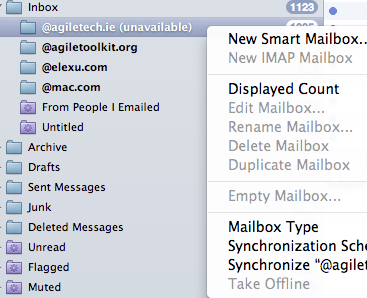

-
 benny
bennyI have a problem with the OS calls used for checking the availability of a server. In theory MailMate should be notified when a server becomes available, but this does not always happen in practice. I've tried various workarounds, but some users still have issues. Unfortunately it is difficult to reproduce. How often does this happen for you? (I ask in order to know if you could help me test workarounds/fixes for this problem.)
Two problems here: 1. Account not coming online automatically after sleep/wake (I assume). 2. Not being able to force it online.
-
Romans Malinovskis
Funny thing is - only one account of 3 show offline, others work ok. I haven't seen more than one account being offline and it occurs randomly.
-
Romans Malinovskis
This might very well be sleep-related.
-
Rob Miller
I can reproduce this 100% of the time after sleeping then waking.
I use my Macbook Air in clamshell mode, and when I plug my keyboard, mouse, and display in and wake my computer, at least one and typically all of the accounts in MailMate are offline. Restarting MailMate always fixes it.
-
Chris Bannerman
This is happening to me too! Is there a solution? Apologies if I have missed something.....
-
benny
@Chris: You haven't missed anything. I've just been a bit slow with regard to dealing with this issue. It's always difficult when I cannot reproduce it myself. Make sure you register for updates to this ticket (enable “watching” it) such that you can follow any progress. I'll probably need some users to run debug versions of MailMate to improve the situation.
-
benny
Those of you still having this problem (and using MailMate), could you fetch the latest (r3621) test release (hold down ⌥ when clicking Check Now in the Software Update preferences pane), and then follow the instructions in the release notes. Feedback is very welcome.
-
benny
Rob Miller reports (via email) that it works for him. (Apparently he has been blacklisted by lighthouse and cannot comment himself on this ticket.)
-
benny
- State changed from new to resolved
-
Maciej
Hi, i've got the same problem as Robert even after the update (i'm on version 1.7.2 (3905)). My inboxes become "unavailable" and i cannot make them available until i restart Mailmate. This happens after couple of hours from the time i run the program and is really annoying.
-
benny
@Maciej:
What are the server addresses for the Inboxes?
Does it happen for all Inboxes?
After relaunching MailMate, try opening the Activity Viewer (⌥⌘0) and keep it open until you observe the “unavailable” state. Then try clicking on some of the connections in the Activity Viewer and see if you can find an error messages.
I don't think this is going to fix it, but you can also hold down ⌥ when clicking “Check Now” in the Software Update preferences pane to get the latest test release (r3921).
-
Maciej
Hi,
at first i thought that this is the problem with gmail and i've created test account on fastmail. The problem occurs in both accounts:
imap.gmail.com and mail.messagingengine.com.I'll keep the Activity Viewer open till the next "unavailability" and will post the results.
-
John N
I also have this problem. I use two accounts, a University IMAP account and gmail IMAP. When I leave my MacBook open for more than a few hours, the school account becomes unavailable and I have to restart MailMate. The gmail account seems to do this less, if at all. I just tried watching the activity viewer while clicking "synchronize all", and while the gmail account cycles through, the other only shows signs of life for a split second before reverting to its normal three grayed-out statuses ("D11 LOGOUT" "C6 LOGOUT" "S10 LOGOUT").
Thanks!
-
Romans Malinovskis
(deleted, i had a different issue there)
-
benny
@john: This is difficult to debug without being able to reproduce it. What is the server address? (Such that I can check the server type.)
If you click on the connections in the Activity Viewer are there then any particular errors leading up to the hanging connections? (You'll need to keep the Activity Viewer open to do this.)
-
Maciej
Trying to connect to mail.messagingengine.com on port 143
Error: Error while waiting on read or write.
Error: Failed while trying to connect to “mail.messagingengine.com”.
This is the error message i have.
In Activity Viewer under the IMAP account that is unavailable i have:
S17 Logout:
D8 Logout:Running IDLE (keeping a live connection) C: S16 IDLE S: + idling Trying to terminate connection... S: <<< terminated reading >>> C: DONE S: S16 OK Completed Trying to disconnect nicely... C: S17 LOGOUT S: * BYE LOGOUT received S: S17 OK Completed Clearing connection to mail.messagingengine.com Synchronizing mailbox: INBOX Selecting mailbox: INBOX Clearing connection to mail.messagingengine.com Trying to connect to mail.messagingengine.com on port 993 Trying to terminate connection... Error: Failed while trying to connect to “mail.messagingengine.com”. Clearing connection to mail.messagingengine.com
(...)
D10 Logout:Synchronizing mailbox (attempting to do it quickly): INBOX/Drafts Selecting mailbox: INBOX/Drafts C: D7 LIST INBOX "" Trying to terminate connection... S: <<< terminated reading >>> Trying to disconnect nicely... C: D8 LOGOUT S: * LIST (\Noselect) "." "" S: D7 OK Completed (0.000 secs) S: * BYE LOGOUT received S: D8 OK Completed Clearing connection to mail.messagingengine.com
(...)Clearing connection to mail.messagingengine.com Trying to connect to mail.messagingengine.com on port 143 Error: Error while waiting on read or write. Error: Failed while trying to connect to “mail.messagingengine.com”. Clearing connection to mail.messagingengine.com Clearing connection to mail.messagingengine.com Trying to connect to mail.messagingengine.com on port 993 Error: Error while waiting on read or write. Error: Failed while trying to connect to “mail.messagingengine.com”. Clearing connection to mail.messagingengine.com Trying to connect to mail.messagingengine.com on port 143 Error: Error while waiting on read or write. Error: Failed while trying to connect to “mail.messagingengine.com”. -
benny
@Maciej: Are you on a slow/unstable internet connection. It looks like it could be a timeout issue which triggers a problem in MailMate.
It'll probably not make a difference, but you can hardcode the Fastmail account to use port 993 for IMAP. They don't support port 143.
-
Maciej
Now the same happened with my gmail account:
D66:
Synchronizing mailbox (attempting to do it quickly): [Gmail]/Drafts
Selecting mailbox: [Gmail]/Drafts
C: D65 LIST "[Gmail]" ""
Trying to terminate connection...
S: <<< terminated reading >>>
Trying to disconnect nicely...
C: D66 LOGOUT
S: * LIST (\Noselect) "/" "/"
S: D65 OK Success
S: * BYE LOGOUT Requested
S: D66 OK 73 good day (Success)
Clearing connection to imap.gmail.com
S18:
(...)
S: * 1394 FETCH (UID 1408 MODSEQ (1126318))
S: * 1395 FETCH (UID 1409 MODSEQ (1126328))
S: * 1396 FETCH (UID 1410 MODSEQ (1126323))
S: * 1397 FETCH (UID 1411 MODSEQ (1126328))
S: * 1398 FETCH (UID 1412 MODSEQ (1126323))
S: * 1399 FETCH (UID 1413 MODSEQ (1126545))
S: S13 OK Success
C: S14 UID FETCH 1414:* (INTERNALDATE)
S: * 1399 FETCH (UID 1413 MODSEQ (1126545) INTERNALDATE "21-Jan-2014 13:32:12 +0000")
S: S14 OK Success
C: S15 UID FETCH 1:1413 (UID FLAGS) (CHANGEDSINCE 1126561)
S: S15 OK Success
Running IDLE (keeping a live connection)
C: S16 NOOP
S: S16 OK Success
Running IDLE (keeping a live connection)
C: S17 IDLE
S: + idling
Trying to terminate connection...
S: <<< terminated reading >>>
C: DONE
S: S17 OK IDLE terminated (Success)
Trying to disconnect nicely...
C: S18 LOGOUT
S: * BYE LOGOUT Requested
S: S18 OK 73 good day (Success)
Clearing connection to imap.gmail.com
S48:
Running IDLE (keeping a live connection) C: S47 IDLE S: + idling Trying to terminate connection... S: <<< terminated reading >>> C: DONE S: Trying to disconnect nicely... C: S48 LOGOUT Error: Time limit (3s) reached while trying to read data (imap.gmail.com) S: Failed (6). Clearing connection to imap.gmail.com Selecting mailbox: INBOX Clearing connection to imap.gmail.com Trying to connect to imap.gmail.com on port 993 Error: Error while waiting on read or write. Error: Failed while trying to connect to “imap.gmail.com”. (...) lots of those Clearing connection to imap.gmail.com Clearing connection to imap.gmail.com Trying to connect to imap.gmail.com on port 993 Error: Error while waiting on read or write. Error: Failed while trying to connect to “imap.gmail.com”. Clearing connection to imap.gmail.com Trying to connect to imap.gmail.com on port 143 Error: Error while waiting on read or write. Error: Failed while trying to connect to “imap.gmail.com”. -
Maciej
For some reason my previous comment has been marked as spam.
-
benny
@Maciej: Another user reports something similar in ticket #606 Problem with mailmate running for a period of time causes an unavailable status.. Let us move the discussion to that ticket.
-
benny
Note that it is very likely that the fix described in #606 Problem with mailmate running for a period of time causes an unavailable status. is also relevant for most of the contributors to this ticket.
Please Sign in or create a free account to add a new ticket.
With your very own profile, you can contribute to projects, track your activity, watch tickets, receive and update tickets through your email and much more.