email doesn't send
Hi,
I've been using MailMate for a day now and I'm very much
impressed.
But I encountred a problem when I wanted to answer an Airbnb
email.
Their addresses come in a particular form: 2do20py8eslnXXXXf5txk1edkw89@reply.airbnb.com
since both parties "real" email address should not been given out
until the transaction has been concluded.
Answering these emails works well in Mail.app so I don't think the trouble lies with the server as stipulated in the screen shot.
Thank you
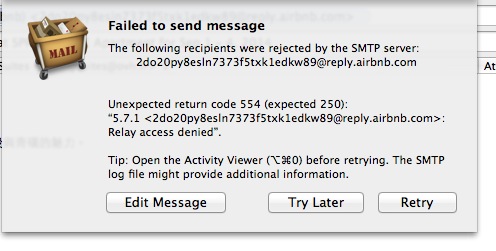

-
 benny
bennyIs it the same SMTP server as used by Apple Mail? It seems the SMTP server is rejecting the message due to some kind of policy.
I can get the full log if you do like this:
- Hold down ⌥ when clicking “Check Now” in the Software Update preferences pane to get the latest test release.
- Open the Activity Viewer (⌥⌘0).
- Try sending a message.
- Send logs using “Help ▸ Send Server Logs”.
I'm not sure it is going to help much, but maybe I can see something suspicious.
-
benny
Also, could it be related to the sending address? Perhaps this should be different for your airbnb account?
-
Michel
Hi,
Thanks for the very quick reply.
As I said on the post I have only be using MailMate for 2 days now and just followed the procedure presented at the first launch, imported my Mail.app boxes and started using it.Yes, it is the same SMTP server as used in Mail.app
Right now I do not have another email of this kind to reply too (I do not have tons of rooms to rent), but I checked the IMAP settings and found out the settings weren't imported "properly".
OVH, our provider requires the port to be set (forced) on 465 so I kicked the box.
Other mails where send properly, I do not know if the address format has anything to do with it.2 More things:
For some mails being sent, it takes a while for them to appear in the "sent messages" box (although I hit "synchronise").
Some sort of of "progress indication" (a small wheel, text, or "à la Mail.app") when hitting "send message" would be welcomed.
It feels a bit strange "nothing" seems to happen although the email is being processed.It has been a while I wanted to switch from Mail.app to another client.
Tried several and none of them was bringing me more satisfaction.
But MailMate looks and feels different.
I will keep testing it as my primary client. Have to get used to it.
Moreover, I'm on a vacation now, so I have less traffic it makes it easier to try out new things.
I already switched "Calendar" for "BusyCal".I will come back to you with logs if I encounter any other problem.
/Michel -
benny
- State changed from new to resolved
Thanks for the update. I'll treat it as resolved, but you can still comment.
If you select the “Drafts” mailbox then you can see the state of each outgoing message including a progress indicator (although there is a known bug which sometimes replaces this with numbers). If you like to keep an eye on this then you can open an additional viewer (⌥⌘N), select the drafts mailbox and hide mailboxes/message view (View ▸ Layout). You'll then have a dedicated window for it.
I'll keep in mind that some global indication of the progress of outgoing messages would be nice (the counter for the Drafts mailbox is a primitive indicator). MailMate does warn you if something is not sent and a sound can be configured for a completed submission (Composer preferences pane).
Thanks for trying out MailMate.
Please Sign in or create a free account to add a new ticket.
With your very own profile, you can contribute to projects, track your activity, watch tickets, receive and update tickets through your email and much more.