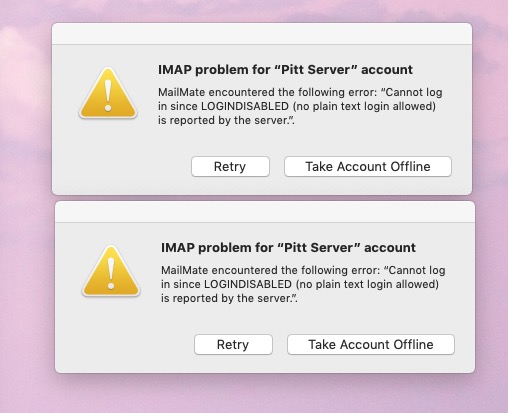
Sudden LOGINDISABLED

-

-
David Crippen
I can get into the Pitt server via iPhone without a problem. Just not my Desktop computer using MailMate. The phone uses another route. I can also get mail with the apple icon "mail".
-
benny
The phone likely uses native Exchange and MailMate only supports IMAP.
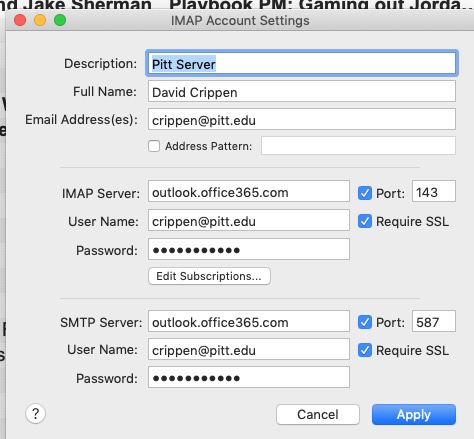
What is the IMAP hostname used for the account? Is “Require SSL” enabled?
-
David Crippen
Don't know, Benny. A couple of hours earlier I got a note that SSL wouldn't work with port 143 so I took it off and it started working again. Then I got the current note was received several hours later. I called the Pitt tech service and as soon as they heard the word "Mac" they brushed me off. "We don't support Mac"
I sent you two photos, I don't know if both mede it.
-
David Crippen
Benny, I clicked SSL back on and it started working again, at least for the moment. I have no idea what these signs that pop up mean but it seems to work now with SSL checked over port 134. When it stopped earlier, it said "port 143 will not accept SSL"
-
benny
- State changed from new to resolved
Ok, I'm not sure what happened with the SSL error message (if it is somehow a MailMate issue), but as a “rule of thumb” you should never disable SSL. The setting only exists because some users cannot make things work without it, for example, if they connect to a local IMAP server.
SSL is what encrypts data between you and the server.
(It is a bit surprising that the server allowed you to make an unencrypted connection...)
Let me know if the issue returns.
Please Sign in or create a free account to add a new ticket.
With your very own profile, you can contribute to projects, track your activity, watch tickets, receive and update tickets through your email and much more.