GPG broken with latest update?

-
 benny
bennyI don't (yet) have reports about a general issue. In what way does it fail? Do you get any error messages? Do you have a “Show Details” button which might tell us more about how it fails?
-
 Jeroen Leenarts
I did a clean install this weekend on a new Macbook. After installing GPGTools everything was working.
You mention latest and greatest. Is that the release version r5523?
I know having the gpg2 command line tool available is required. Maybe something changed in your paths inadvertently. I'd check that. maybe even try reinstall GPGTools. Or check your home-brew install.
-
benny
Yes, r5523 is the latest release.
Note that you can enable a debug variable in a Terminal window to see how MailMate calls
gpg2:defaults write com.freron.MailMate MmDebugSecurity -bool YESThen launch MailMate like this:
/Applications/MailMate.app/Contents/MacOS/MailMateThat might also help.
-
Ulrike
I have the same problem that Laurent reports: After upgrading to r5523, signing (haven't tried encrypting) has ceased to work, with no other changes to the machine (still running Sierra).
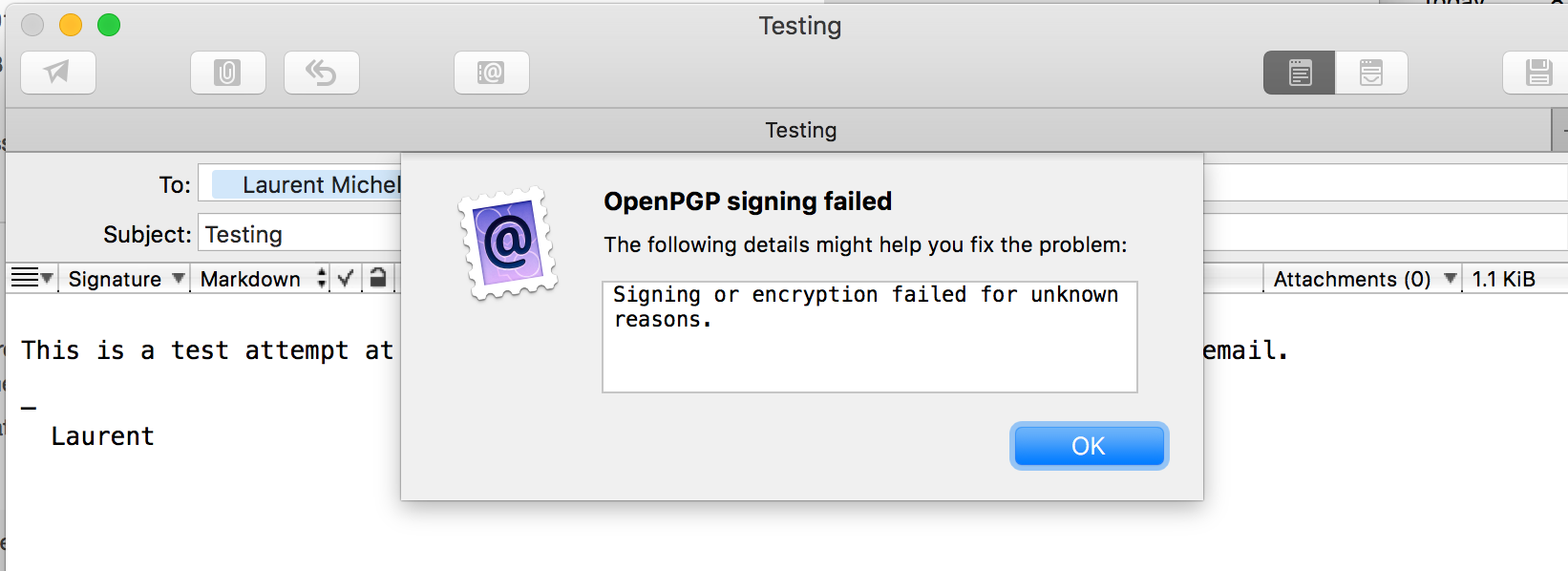
There is in fact a detailed error message, it reads "Signing or encryption failed for unknown reasons."
I set the debug variable as recommended and get "Warning: Refused to send email with unresolved security warnings. Please report this issue." in the terminal. The email is in fact not sent with no other feedback in the GUI (hm...).
I don't see the actual call to gpg2 in the terminal, am I looking in the wrong place?
-
Mathias Woringer
I haven't changed anything on my El Capitan Mac (I'm also using an older version of GPG from last year).
I can't decrypt encrypted mails from my colleagues, although I have their public key. I'm also using OSX mail as well and the decryption works flawlessly.
Here is the error message:
Result: Failure
Output string (0): "" Detail: gpg: invalid option "--compliance"So this update definitely broke the old GPG. I'm not sure I want to install the latest GPG version though.
-
Lars
That option was introduced with GnuPG 2.1.16 released November 18th, 2016. Which version are you using exactly?
-
Mathias Woringer
I have the GPG Suite 2016.10 21 version.
-
Mathias Woringer
Installing GPG update now.
And that fixes the problem for me.
-
Lars
That is still running on GnuPG 2.0.30 which is why that option is not recognised; the next update after that, which is GPG Suite 2017.1, made the jump to GnuPG 2.2.
Most recent would be GPG Suite 2018.3 from earlier this year, which fixes important security issues.
Even if benny solves this compatibility issue, it is most likely an excellent idea to update that outdated software.
-
benny
I think it's fine if MailMate requires a more recent (and safer) version of
gpg2. As long as it is available via GPGTools (and maybe homebrew).@Ulrike: You also have to launch MailMate from the Terminal window to get the error messages in the same window:
/Applications/MailMate.app/Contents/MacOS/MailMate -
Laurent Michel
Ok, I enabled debugging and here ios what I captured. First, see the screenshot for what appears in the UI of MailMate. Second, here is what shows up in the terminal window:
ldm at abraracourcix in ~
$ /Applications/MailMate.app/Contents/MacOS/MailMate
2018-09-11 09:00:23.495 MailMate[92756:4395904] altered replacementRange: {0, 16}
2018-09-11 09:00:23.495 MailMate[92756:4395904] replaceString:
OpenPGP
 gpg2 --no-verbose --batch --no-tty --compliance "openpgp" --status-fd 2 --textmode --armor --local-user "<ldm@redacted.org>" --detach-sign
 Input string (53): "Content-Type: text/plain; markup=markdown\r\n\r\n\r\n"
 Result: Failure
 Output string (0): ""
 Detail: gpg: invalid option "--compliance"
OpenPGP
 gpg2 --no-verbose --batch --no-tty --compliance "openpgp" --status-fd 2 --textmode --armor --local-user "<ldm@redacted.com>" --detach-sign
 Input string (243): "Content-Type: text/plain; charset=utf-8; markup=markdown\r\nContent-Transfer-Encoding: quoted-printable\r\n\r\n\r\nThis is a test attempt at sending from one address of mine to another a s=\r\nigned e..."
 Result: Failure
 Output string (0): ""
 Detail: gpg: invalid option "--compliance"
So there is a
--complianceoption that gpg2 does not like.I checked my gpg version:
$ which gpg2
/usr/local/bin/gpg2

ldm at abraracourcix in ~
$ gpg2 --version
gpg (GnuPG/MacGPG2) 2.0.30
libgcrypt 1.7.0
Copyright (C) 2015 Free Software Foundation, Inc.
License GPLv3+: GNU GPL version 3 or later <http://gnu.org/licenses/gpl.html>
This is free software: you are free to change and redistribute it.
There is NO WARRANTY, to the extent permitted by law.

Home: ~/.gnupg
Supported algorithms:
Pubkey: RSA, RSA, RSA, ELG, DSA
Cipher: IDEA, 3DES, CAST5, BLOWFISH, AES, AES192, AES256, TWOFISH,
        CAMELLIA128, CAMELLIA192, CAMELLIA256
Hash: MD5, SHA1, RIPEMD160, SHA256, SHA384, SHA512, SHA224
Compression: Uncompressed, ZIP, ZLIB, BZIP2
Maybe I need to upgrade this? If that's the issue, maybe the UI should simply tell me. Let me know.
Best,
Laurent
-
Laurent Michel
And upgrading gpg2 solved the issue!
Perfectly happy to upgrade. It would be nice if the UI had told me that this was a required upgrade.
Thanks!
Laurent
-
benny
@Laurent: Yes, it wasn't on purpose. I didn't actually know
--compliancewas a newgpg2setting. -
Laurent Michel
@benny: Not a problem! I should have thought about updating GPG. Loves MailMate to death ;-)
-
Ulrike
Upgrading gpg2 solved the issue for me, as well.
Thanks for talking us through this, benny! (Btw, I did start MailMate from the terminal - but it's all good now, so never mind.)
-
benny
- State changed from new to resolved
I'm glad it works for everyone. I'll look into improving some of the error output which wasn't as helpful as it should have been.
Please Sign in or create a free account to add a new ticket.
With your very own profile, you can contribute to projects, track your activity, watch tickets, receive and update tickets through your email and much more.