Resynchronization Problems!
Hi,
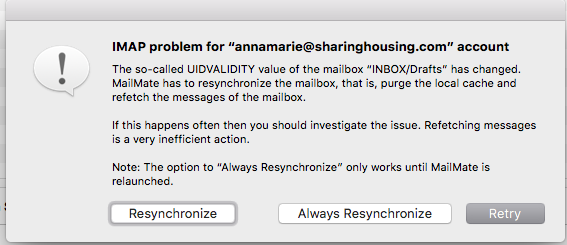
Moved servers. Cpanel to Cpanel. When MM popped up a message (as attached) _ I chose Resynchronize. MM popped up 3 (?) times more and I hit it again and then all my emails dissapeared. This happened on three email accounts. (But not two others - why?) So my current question is how can I use my backups to have access to those mails again? I have timemachine backups, the original cpanel backup (gar.tz format) and mails on my iphone. Ideas
1) One thought I had was to turn off wifi connection, go into
TM, restore and then archive them by pulling them into finder.
Would that work?
2) forward all my mails from iphone to an account I create , eg
lostmails@domain.com and
then archive them.
OR??
I don't understand how mail actually works so I don't know what I can/can't do.
And yeah - I shoulda archived all email BEFORE moving servers. Sigh.
Thanks
Annamarie

-
 benny
bennyFirst, let's make sure you don't lose the emails for good. The best you can do is find the most recent Time Machine backup and then copy this folder, e.g., to your Desktop:
/Users/<username>/Library/Application Support/MailMate/Messages/IMAP/You might only need the subfolders with the lost accounts.
After this, you can try “File ▸ Import Messages” in MailMate to get the emails of an account into the account again (if needed). Note that you can make MailMate re-create a hierarchy of folders if needed. If you only have a few folders then maybe take them 1 by 1 to make sure it works as expected. MailMate takes care of uploading the emails to the IMAP server(s).
Now, why did this happen? The requester you got warns you about a major change on the server. Each mailbox on a server has a unique value (UIDVALIDITY) which the email client must use to make sure that the mailbox is still the same one as the last time the email client synchronized. If the value changes then it's because it's not the same mailbox. This could, e.g., happen if you deleted the mailbox with a different email client and re-created it with the same name (and possibly a different set of emails). The only safe thing MailMate can do is then to forget everything about the mailbox and refetch its emails.
Why did the emails disappear? I'm 99% sure that the emails were already gone one the server. MailMate just didn't know it yet. It's similar to deleting all emails in another email client. MailMate would then still know the emails until it synchronizes the account. That's when they'll disappear in MailMate.
MailMate only deletes emails on the server when explicitly told to do so. The first time you delete something then it's always moved to the “Deleted Messages” mailbox of the account. In other words, most emails need to be deleted twice before MailMate tells the server to delete them permanently. This is unlikely to have happened in this case. It is much more likely that something went wrong during the move on the server.
The accounts that didn't fail: It's not unlikely that MailMate also forgot everything about the emails in these accounts (due to new UIDVALIDITY values), but the emails still existed on the server and therefore MailMate could refetch them.
I hope that helps a bit.
-
Annamarie Pluhar
Thank you!
Please Sign in or create a free account to add a new ticket.
With your very own profile, you can contribute to projects, track your activity, watch tickets, receive and update tickets through your email and much more.