spotlight search opens mail not mailmate
Hello
spotlight search works yay great -
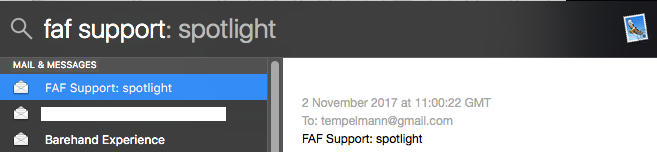
But when I search (using cmd-spacebar) I see my mail messages
(see attached for evidence)
but if I click on one, they get opened by the default Mail client -
not mail mate - even though MM is selected in Mail as the default
client.
Any ideas?
Thanks
m.c.
-
 mailMateSpotlightResult.png
38.1 KB
mailMateSpotlightResult.png
38.1 KB

-
 benny
benny- State changed from new to resolved
This might be because the email was found within Mail storage (.emlx files) and not MailMate storage (.eml files).
Note that you need to enable Spotlight indexing in the General preferences pane of MailMate for the emails to be indexed.
The application used to open the files depends on which app has been chosen to open
.emlxand.emlfiles. If you select one of these files in the Finder then you can use “Get Info” to change this (use the Change All button after selecting MailMate).I hope this helps. Otherwise let me know.
-
m.c.
they were all .eml files - checked using get info.
and as noted above - spotlight search works
and what did work is - what you suggest - i checked the file - in get info it was saying open eml files with mail, not mailmate - did a change all and that works
was just about to write you to say "i think this is sorted" when i saw your mail.
thank you
Please Sign in or create a free account to add a new ticket.
With your very own profile, you can contribute to projects, track your activity, watch tickets, receive and update tickets through your email and much more.