incoming mailboxes have "To" as default column instead of "From"
I wanted to add Tags as a column to one of my Sent Messages mailboxes, for sorting purposes. I did this and then chose "Use as Default Columns," expecting it to set the default for this mailbox only or perhaps for all Sent Messages.
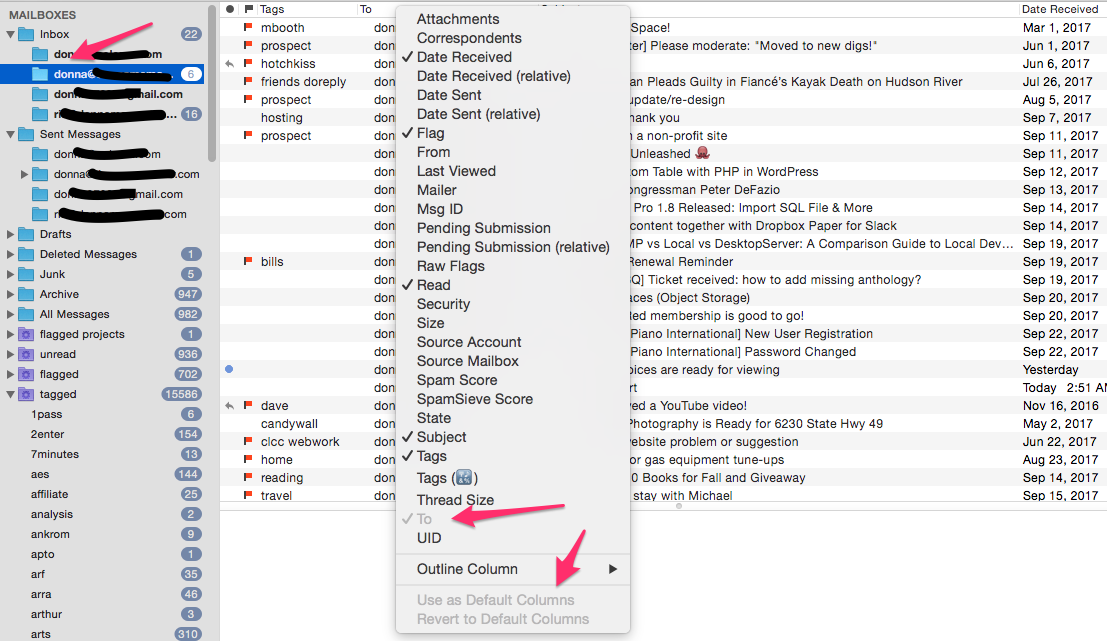
However, it set it as default for my Inbox mailboxes as well. See attached screenshot; this is my primary inbox, and not only is "To" the default, it's grayed out so that I can't unselect it.
All other inboxes have the same default. I tried restarting
MailMate, and ran the command suggested in Ticket #1825:
defaults delete com.freron.MailMate MmMailboxRelatedStates
But the Inboxes are still determined to display the "To" column instead of the "From" column. Grrrr!
Any suggestions appreciated!
Donna
-
 column-selection.png
275 KB
column-selection.png
275 KB

-
 benny
benny- State changed from new to closed
The column cannot be removed because it's the column used for threading (the column with the triangles). You can change this in the same menu (the “Outline Column” submenu). If some other column is chosen then the “To” column becomes removable.
Deleting the default state is done like this:
defaults delete com.freron.MailMate MmMessagesOutlineViewDefaultStateMainOutline(As you have probably seen elsewhere I certainly don't think saving column states works very well.)
Let me know if this does not help.
-
Donna McMaster
Thanks, Benny! I had never even noticed the Outline Column option and didn't know what it was for. This worked.
Please Sign in or create a free account to add a new ticket.
With your very own profile, you can contribute to projects, track your activity, watch tickets, receive and update tickets through your email and much more.