Version 1.9.6 (5344) changes default column widths upon upgrade
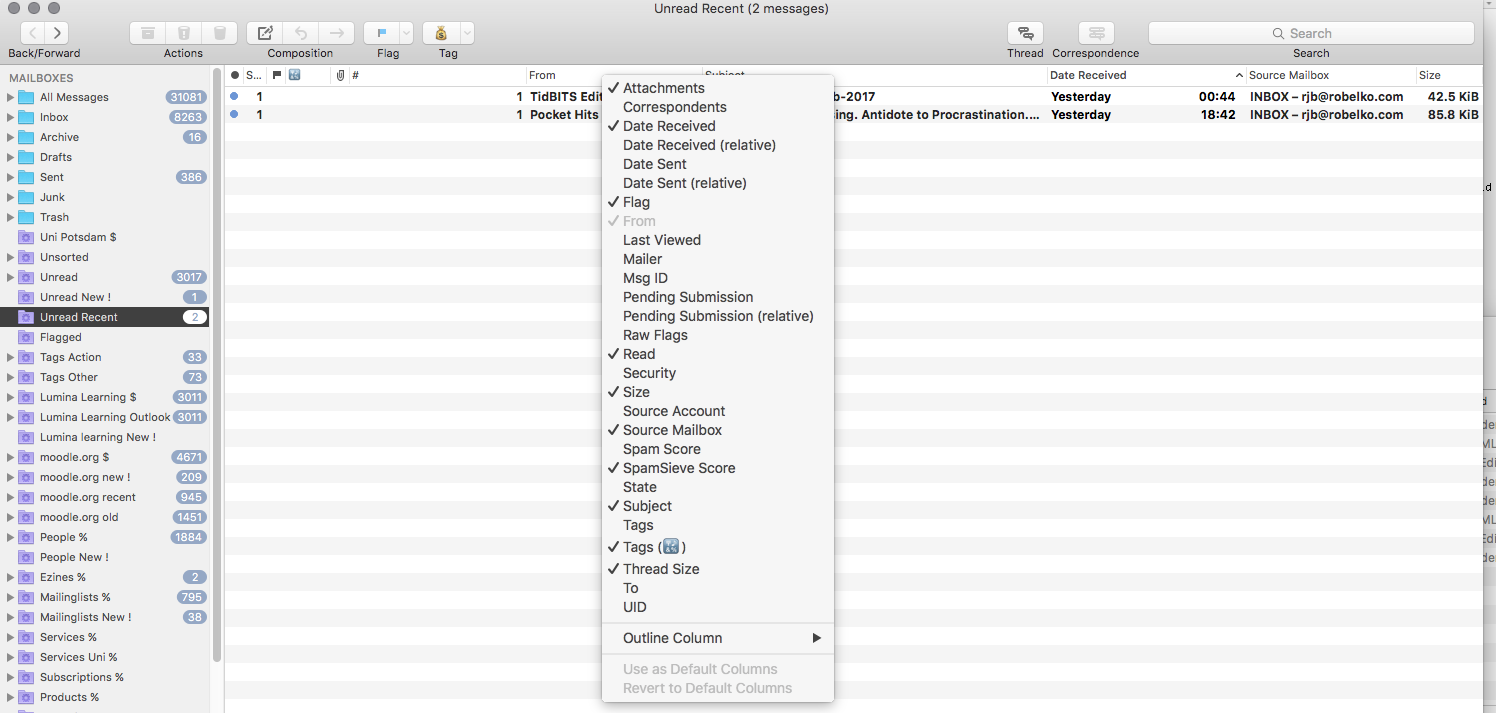
I just noticed that my columns are wrong. I am talking about the panel with the list of messages in the selected mailbox. See the attachment. The column marked #, that is the count of messages in the thread, was set to be wide enough to show just 2 digit number before I upgraded. Now, after upgrade, it is way wider, causing other columns, From in particular, to be narrower. This was my Default Columns setting. Mailboxes that do not use the default view are not affected. By coincidence or not, they do not have the thread counter column.

-
 Robert Brenstein
I just resized columns to what they used to be. MM took the new sizes automatically as the default without me having to select "Use as Default Columns" item from the popup menu. Yes, those 2 menu items at the bottom continue to stay gray and the new column settings are remembered as I switch mailboxes.
-
Chris
In 1.9.6 (5344) "Revert to Default Columns" can be successfully applied to Junk, Sent and Drafts folders, and the options "Use as Default Columns" and "Revert to Default Columns" will be grayed out afterwards. However, as soon as you switch to another folder the column layout of Junk, Sent and Drafts folders changes back to its previous non-default state and "Use as Default Columns" and "Revert to Default Columns" become available again. This does not happen with other folders and should not do with Junk, Sent and Draft folders.
-
Robert Brenstein
Chris, what you describe sounds like an issue I reported in another ticket, #1647
Please Sign in or create a free account to add a new ticket.
With your very own profile, you can contribute to projects, track your activity, watch tickets, receive and update tickets through your email and much more.