Missing "cancel" or "abort" choice for bad server responses
Hi,
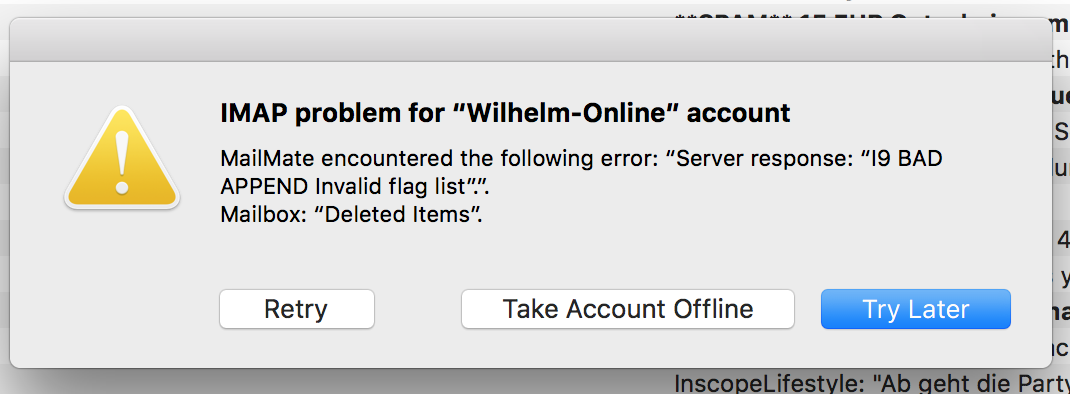
I've tried to move a mail from one map folder into another, but I got a "I9 BAD APPEND Invalid flag list ''." as server response.
Now I have only the following choices:
a) "Retry": fails with the same error message
b) "Take Account Offline": As the account works fine and contains important messages, this is no valid option for me
c) "Try Later": That is the option, which I now press every day (!)
It would be great, if MailMate has a fourth option "cancel" or "abort operation".
A manual workaround is, to remove this account and add it again. But this will take a while, because the account contains a lot of messages.
I am using MailMate Version 1.9.5 (5263) on a MacBook Pro Sierra 10.12.1 (16B2555), which are latest versions of both.
It would be great to hear from you,
Marc

-
 benny
bennyI'd like to see why/how the move action fails (in case it's triggered by a MailMate bug). If you hold down shift (⇧) when clicking “Retry” then a log file should be created. You can send it to me using “Help ▸ Send Feedback” and I'll review it.
To fix the issue manually, you can enable the UID column in the message list in the “Deleted Items” mailbox. Any message with no UID has not been uploaded yet and could be the one triggering the issue.
-
Marc Wilhelm
Benny,
thank you for the fast reply. Unfortunately I have recreated my mail source meanwhile, but I'll try to reproduce it again und send feedback to you.
Best regards,
Marc -
-
Marc Wilhelm
Please leave this ticket some days open, because this bug has occurred 3-4 times and I am sure, I can reproduce in some days.
BR
Marc -
benny
It's fine that you add new comments to it even if I've put it in the
cantreproducestate. -
Marc Wilhelm
Benny,
I was now able to reproduce the problem. Please find on the attachment the logs.
BR,
Marc-
 mailmate_logs.tar.gz
2.02 KB
mailmate_logs.tar.gz
2.02 KB
-
-
benny
That was informative. This is what I see:
19:56:32 C: I4 SELECT "Deleted Messages"
...
19:56:32 S: * OK [PERMANENTFLAGS (\Deleted \Seen \Answered \Draft \Flagged $MDNSent $Forwarded $AutoJunk $AutoNotJunk $Junk $NotJunk)] Permanent flags
...
19:56:32 C: I9 APPEND "Deleted Messages" ($AutoJunk) "14-Nov-2016 19:01:58 +0100" {62155}
19:56:32 S: I9 BAD APPEND Invalid flag list
MailMate opens the “Deleted Messages” mailbox. The server tells MailMate which IMAP keywords are allowed and this includes
$AutoJunk. When MailMate tries to upload an email with the$AutoJunkkeyword then the server returns an error. (Note that even though the human readable string indicates that the flag is the problem then it's not really something MailMate can rely on.)In other words, this is clearly (yet another) Exchange IMAP server bug.
You can test my theory by creating a tag in the Tags preferences pane which maps to the IMAP keyword
$AutoJunk. You can use this to remove the keyword from the message before trying to upload it again.In general, I try to work around server bugs, but it's not quite clear how to best work around this one. First, let me know if you can confirm my theory above.
Please Sign in or create a free account to add a new ticket.
With your very own profile, you can contribute to projects, track your activity, watch tickets, receive and update tickets through your email and much more.