Need help in creating Smartboxes for Multiple Accounts
My system: MailMate/5187 MacBookPro11,5/x86_64/8/10.10.5
Hi,
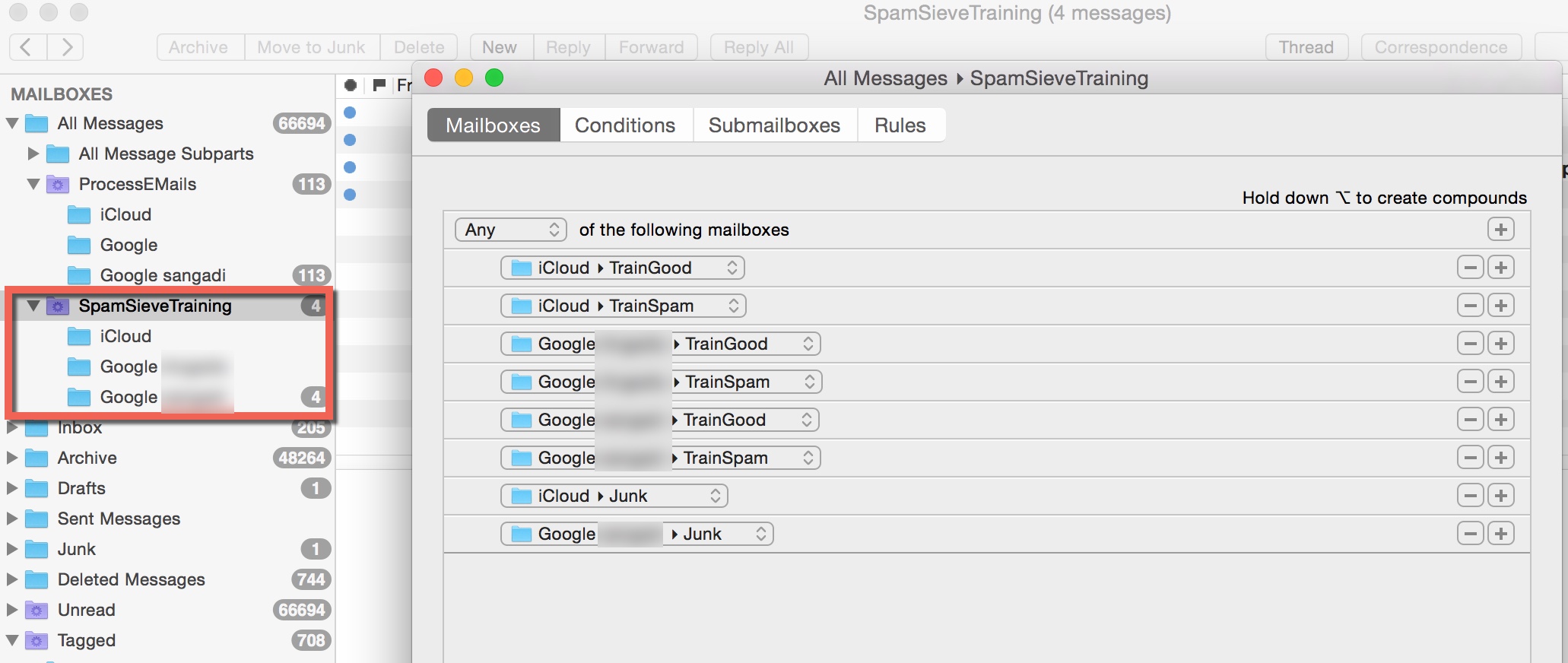
I have three IMAP Accounts and I have setup folders for training
SpamSieve.
I set up conditions to pick up the mails from the accounts as shown
in the Screen shot below/attachment
How can I setup the Smartbox so that I can see
iCloud
Junk TrainGood TrainSpam Google XXXXX
Junk TrainGood TrainSpam Google YYYYY
Junk TrainGood TrainSpam
Right now all the sub Mailboxes are unified as
iCloud
GoogleXXXXX
GooogleYYYYY
Thanks
Santosh
-
 MailMate-SpamSieve-Setup.jpg
296 KB
MailMate-SpamSieve-Setup.jpg
296 KB

-
 benny
benny- State changed from new to closed
I'm not sure exactly what you are trying to do, but try looking in the “Submailboxes” pane of the “Unread” mailbox. Maybe that is similar to what you want?
You can also enable the “Source Mailbox” column in the message list if you want to see the original mailbox of each message.
Let me know if this does not resolve your issue.
Please Sign in or create a free account to add a new ticket.
With your very own profile, you can contribute to projects, track your activity, watch tickets, receive and update tickets through your email and much more.