Smart mailboxes lost after crash

-
 benny
benny- State changed from new to cantreproduce
It's this file:
~/Library/Application Support/MailMate/Mailboxes.plistDoes this mean that a simple crash destroyed your mailboxes? Could you attach the crash report related to this if you still have it?
Did you then just get the default set of mailboxes?
-
mariow
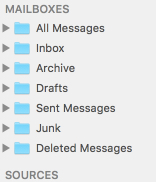
Unfortunately I did not save the crash report. Another program (can't remember which) crashed at the same time and I just clicked away the message unfortunately (not sure what caused the crashes though). Right now I have the default mailboxes and none of the default smart mailboxes. I'm attaching a screenshot of the sidebar.
My Mailmate folder does contain a "Mailboxes.plist.invalid" but it is only half the size of my current Mailboxes.plist file and one day old (making it older than the crash, so this is probably irrelevant)
I'll try to restore the Mailboxes.plist from my backup and see what happens.
-
mariow
A simple restore of yesterdays Mailboxes.plist fixed it, thanks a lot!
Unfortunately it seems that I won't have any helpful data to reproduce the issue. -
benny
Hmm, I would have expected that invalid file to be the problem. Somehow MailMate saved a file which is was not able to read later one. Finding the bug involves finding out what MailMate saved.
Could you send it using “Help ▸ Send Feedback”? I can then also look into why it's small.
-
mariow
Of course, the file is on it's way to you
Please Sign in or create a free account to add a new ticket.
With your very own profile, you can contribute to projects, track your activity, watch tickets, receive and update tickets through your email and much more.