Emails duplicate in Smart Mailbox, but not in Inbox
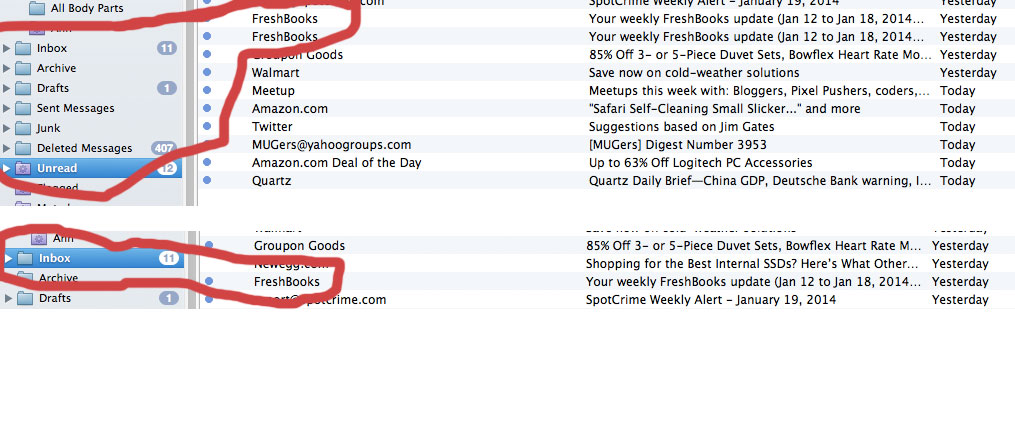
Had not noticed this before today. Several of my emails this morning were being displayed twice in the default "Unread" smart mailbox. In the Inbox the emails were only displayed once. See the attached image.
At first I thought they were duplicated emails before I realized I was in the smart mailbox.
Using Version 1.7.2 (3905) on Mavericks 10.9.1
Thanks,
Jim
-
 mailmate-bug.jpg
116 KB
mailmate-bug.jpg
116 KB

-
 benny
bennyEnable the “Source Mailbox” column in the messages outline to see where the two messages are really located (one of them is in the Inbox, but the other one might be elsewhere). Note that “Unread” is based on “All Messages”.
-
Jim Arnold
Hi Benny,
You were correct. The emails are in two different email boxes. I assume this is because of the unusual way Gmail does their interpretation of IMAP. I've attached an example. What is the difference between [Gmail/Import - Gmail] and INBOX - Gmail? Why do I have to see both, cluttering things up?
Thanks,
Jim -
-
Antonio Miranda
- State changed from resolved to new
Hi benny, hope this finds you well.
Sorry for bringing this old thread to life. I searched everywhere and this is the only place I saw this being discussed.
I'm struggling to set Gmail's \Important label as a tag in MailMate following your guide in the link provided on your last post
Since this is super old, I'm wondering if anything changed on MailMate or Gmail's end?
When I set Gmail label as '\Important', MailMate still fetches the [Gmail]/Important folder.
When I set Gmail label as '[Gmail]/Important', MailMate does not fetch the [Gmail]/Important folder but does not add the 'Important' tag on the messages.
I've tried reseting the message and removing and adding the account to no avail.
Would love to hear from you or anyone who have this working.
Thanks
AJ -
Antonio Miranda
If anyone stumble into this thread with the same issue, I've got it working.
The correct Gmail label in the tag setting is indeed '\Important' as stated in the manual. The gotcha is you cannot be subscribed to the Important mailbox in MailMate.
Facepalm since this is exactly the last message from benny in this thread, but since it's unrelated to tagging I guess I just didn't pay attention to it.
-
benny
I'm glad you figured it out! It would be nice if this worked better out of the box, but I try to not spend too much time on making special workarounds for Gmail (more than I've done already).

Please Sign in or create a free account to add a new ticket.
With your very own profile, you can contribute to projects, track your activity, watch tickets, receive and update tickets through your email and much more.