Dark Mode and MailMate
I love that MailMate supports dark mode but this should be an optional feature. More like a dark theme or something. See attached image on how difficult it is to work with MailMate in Darkmode.
Please make it an option.
-
 20180925080312.png
263 KB
20180925080312.png
263 KB
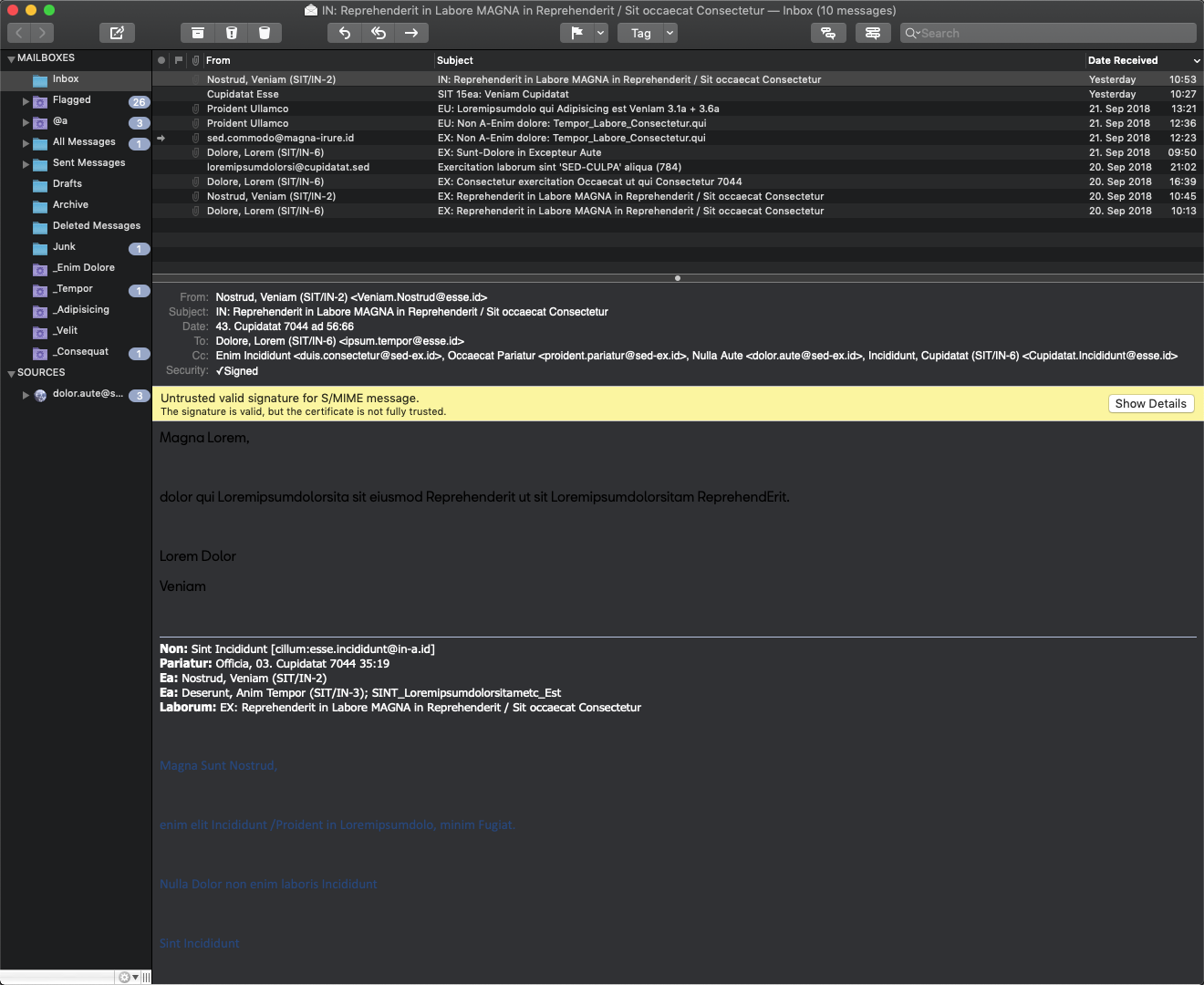

-
 benny
benny- State changed from new to reproduced
Dark mode in MailMate is still work in progress. I'm aware that it doesn't work well for all emails and I'll either fix that or somehow make it optional for the message view.
Sorry about the inconvenience.
-
John Dickinson
I've been able to update the message view css to give something better (IMO)--see http://d.not.mn/mailmate_dark_mode.png
But i would love to be able to customize the colors on the message outline view and the mailboxes view. I'd like to adjust the text color, the alternating colors, and most of all, the ovals with the numbers in it. Is there any way to change these?
-
 Matt Gray
+1 - thanks for working on this, Benny!
-
J. David
Just upgraded from High Sierra to Mojave today with the release of 10.14.1, and got hit with this. An option to exclude the message view from dark mode (similar to what Apple Mail has) would be very welcome!
Please also take a look at the unread message counters; they are extremely low contrast and very difficult to read.
Thanks!
-
benny
@David: On Mojave I recommend upgrading to the latest test release: Hold down option when clicking “Check Now” in the Software Update preferences pane.
-
J. David
Updated to 5547. Huge improvement to the dark mode! Especially the Mailboxes list, which is now very readable and better than Apple Mail in my opinion. Great job!
I do not see an option to render the message viewer in black-on-white, so I'm guessing that's not ready yet? (It does sound complicated!) When that is ready, will it apply to composing messages as well? Even with the improved contrast, I'm having real trouble reading & writing emails in white-on-black.
-
benny
@David: MailMate no longer tries to display emails as white on black if they are not plain text messages. This should make everything readable. I still have a persistent white-on-black setting on my todo.
-
J. David
Great, thanks!
I see that 5551 backed off the contrast a bit on the mailbox badges. Though I did slightly prefer how they looked in 5547, I suspect the newer look is probably closer to how it's "supposed" to be. :-)
-
benny
@David: Well, actually they should probably be somewhere between what they were before and what they are now. It seems that there is no standard system color matching what is used by Mail, but I might just not have looked hard enough.
-
J. David
Good luck with that! I tried to read the official Apple dark mode developer guidelines and my eyes crossed before I was halfway through! :)
-
 John Y
The HTML links in plain text emails are showing in dark blue on black, and are illegible. The message header values (for Subject, etc) are appearing in white on light grey, and are similarly illegible.
I've added the following as
dark_mode_stylesheet.css, which has fixed the links and gone back to a light background for plain text messages (for consistency with the HTML renderer) but I can't find a way to change the headers.Could somebody please let me know what style I need to customise here?
(Would attach a screenshot, but the attachment section of this form is saying "Upload Quota Reached. Please notify the account owner"…)
body { background-color: #f0f0f0; color: #0a0a0a; } table.attachments { background-color: #303134; color: #f0f0f0; } table.attachments td.description a:link { color: #f0f0f0; } div.headers, td span.header_body { color: #0a0a0a; } div.bodypart[type=text][subtype=rfc822-headers] { background-color: #36373A; color: #f0f0f0; } div.headers a:link { color: #0a0a0a; text-decoration: none; } div.headers a:active { color: darkblue; } div.headers a:hover { text-decoration:underline; } div.headers a:visited { color: #0a0a0a; } -
benny
- State changed from reproduced to accepted
@John: Are you having the exact same issues with latest public release? I changed it such that only plain text emails are in “dark mode”. Everything else (HTML emails) is shown as in light mode.
In any case, also try the latest test release: Hold down option when clicking “Check Now” in the Software Update preferences pane.
I'm putting this ticket in the “accepted” state to reflect that some users would just like to always have headers and message view in light mode.
-
John Y
I can confirm that all the issues are fixed, except for the link colour in plain text messages. That's still too dark to be legible (see attached screenshot), even in r5566.
I assume it's just taking the system default, as I can't see it being set anywhere in the .css files…
-
benny
@John: I think this is caused by some of your customizations. This type of email is HTML and it should therefore (currently) be displayed with a white background. (Exactly because of this and many other potential coloring-issues.)
-
John Y
No, I commented out all the customisations.
That email is sent as HTML and plain text, and I default to viewing the plain text version, which is what the screenshot is from.
The HTML version shows in black-on-white, yes, but I don't want to have to manually toggle the view each time — or to have to view the HTML version at all if the plain text version can be made legible.
-
benny
I'm still unable to reproduce this. I've got the dark mode plain text look with the dark mode blue color. This is also the case if I enable the “Prefer Plain Text” setting.
But maybe I have customizations enabled. I'll check that (although I would have expected more users complaining about the links).
-
benny
Still no luck finding the settings which could cause this.
Do you perhaps have
MmDefaultCSSconfigured?Have you tried relaunching MailMate after removing your customizations?
-
John Y
I don't think I have
MmDefaultCSSconfigured — the key doesn't exist incom.freron.MailMate.plist.I've tried relaunching with
~/Library/Application
Support/MailMate/Resources/MmMessagesWebView
completely removed but it makes no difference.As a workaround, I could specifically style it in
dark_mode_stylesheet.css— I'm guessing I need to be a bit more specific than just styling theatag, though — is there a parent element for the message body that I could use? -
benny
I found the problem. Check your “Theme for plain text emails” setting in the Viewer preferences pane. Switch to “Simple”.
I had simply forgotten that my solution for themes was a temporary one which does not work in general. Sorry about the inconvenience. I'll look into finding a better approach than the current one -- the best solution requires some CSS support which is not yet available on Mojave in general (it's available in the Safari Technology Preview app).
-
John Y
Switching to "Simple" didn't fix the problem — but "Standard" did. I managed to look right past that option when I was checking the preferences, too :)
Thanks!
-
benny
“Standard” was what I meant :-)
The issue causing this is fixed in the next update. I also fixed some related coloring issues. (There's much more I should do, but this should be good enough for now.)
-
 Ioa Petra’ka
Hopefully you don't mind if I add to this ticket, as it seems roughly relevant. I noticed that the CSS for the built-in "Email not available on disk" message, that appears in the mail viewing area, needs to be tweaked for dark mode:

-
Ioa Petra’ka
Actually, never mind! I was a build or two behind the present tense. I just updated the software and this text is now coming through clear.


Please Sign in or create a free account to add a new ticket.
With your very own profile, you can contribute to projects, track your activity, watch tickets, receive and update tickets through your email and much more.