Icons look totally weird on Monterey 12.1 (mm 5864)
The switch to sf symbols seems to have broken the icons (see screenshot).
I suspect it has to do with some settings I have to make stuff larger because of my eyesight.
In Mailmate: the sidebar font is set as "Helvetica Neue, Regular, 15".
And in System Prefs:
General > Sidebar icon size > Medium
Accessibility > Display > Reduce transparency
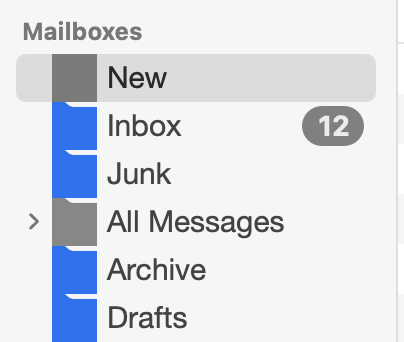

-
 benny
bennyDo you still see this with the latest test release (r5872+)? I'm unable to reproduce it.
If you do, could you send me the following file using “Help > Send Feedback”:
~/Library/Preferences/com.freron.MailMate.plist -
Cinnamon Roll
I found the culprit:
% defaults read com.freron.MailMate MmMailboxImagesEnabled
0
This makes the icons go wonky. Doing
% defaults delete com.freron.MailMate MmMailboxImagesEnabledmakes them work as expected. Sorry for the confusion, looks totally like user error (with a part of leftover old code I guess?).
-
benny
- State changed from new to resolved
Thanks for the update. I'll see if I can reproduce it and make sure that this combination of settings is not allowed. (It's partly because of code having to remain active to make things work on pre-macOS 11).
-
benny
Next update will have this “fixed” which means that only the following combination will work:
defaults write com.freron.MailMate MmMailboxImagesEnabled -bool NO
defaults write com.freron.MailMate MmSFSymbolsEnabled -bool NO
That'll bring back some very old-style macOS-based colored icons, but this is a dying feature. It'll eventually be removed.
Please Sign in or create a free account to add a new ticket.
With your very own profile, you can contribute to projects, track your activity, watch tickets, receive and update tickets through your email and much more.