Bad synchronisation, then crash on launch, after updating iOS devices to 10
I have been a happy user of MailMate for several months now.
However, since I updated the iOS on my iPhone and iPad to 10, the
synchronisation of mail has been problematic: Often the mail I have
read and moved to a folder in one OS (i or X) still resides in the
inbox in the other OS.
These issues culminated, about a month ago, in MailMate crashing
repeatedly.
Currently, MailMate crashes whenever I try to launch it.
Restart of computer has little effect (though, strangely, yesterday
MailMate ran fine for 1/2 the day).
Please find attached the problem report as well as the result of trying to start from the command line.
Perhaps this has nothing to do with the iOS on my other devices accessing the same google, mac, and exchange accounts --- but the coincidence is there in time.
Thank you for an otherwise good product, I hope to be able to use it again soon.
Best,
Simon.
-
 ProblemReportMailMate.rtf
88 KB
ProblemReportMailMate.rtf
88 KB
-
terminalStartErrors.rtf
1.36 KB

-
 benny
bennyAlthough the trigger might be some change to a message on another device I don't think it's related to the iOS updates. The problem is a bug in MailMate which I have not been able to track down, because it has a tendency to resolve itself before I get sufficient debug info.
Please try launching from a Terminal window like this:
defaults write com.freron.MailMate MmGenerateServerLogsBeforeCrash -bool YES
/Applications/MailMate.app/Contents/MacOS/MailMate
That should generate a file on your Desktop when it crashes. Send that to me together with the Terminal output.
Thanks in advance!
-
Simon Nørrelykke
Dear Benny,
Thank you for rapid reply.
Herewith the output from terminal.Simon
-
mailmate_server_logs.tar.gz
257 Bytes
-
-
benny
Sorry, could you repeat the task after enabling this hidden preference:
defaults write com.freron.MailMate LoggingEnabled -bool YES -
Simon Nørrelykke
Done.
Please see rtf for order or terminal commands and terminal output.-
terminalCommands.rtf
2.13 KB
-
mailmate_server_logs.tar.gz
6.53 KB
-
-
Simon Nørrelykke
Hi Benny,
You seem busy.
This end: MailMate still completely dead (crashes on launch).
Any hope for a fix, even temporary - files I can delete and try again?Would updating OS to Sierra help, perhaps?
Or, do I need to simply delete the app so the rest of my programs no longer link to MailMate as the default mailer - get on with life and forget MailMate for a while? -
benny
- State changed from new to cantreproduce
I'm very sorry about the late reply! It's a serious issue and I simply failed to prioritize it correctly.
First, updating to Sierra won't help.
The output helped a bit, but it didn't help me realize exactly what the issue is.
I'd like you to try again while also enabling this preference:
defaults write com.freron.MailMate MmTrackDatabaseEvents -bool YESIf you are comfortable using the Terminal then we can force MailMate to resynchronize your account(s) in order for you to use MailMate while debugging this issue.
First rename the MailMate support folder:
mv ~/Library/Application\ Support/MailMate ~/Library/Application\ Support/MailMateBugThen create a new folder:
mkdir ~/Library/Application\ Support/MailMateFinally, copy the preferences:
cp ~/Library/Application\ Support/MailMateBug/*.plist ~/Library/Application\ Support/MailMate/You should now be able to launch MailMate and let it refetch all emails.
Now, switching to the buggy MailMate database, you need to rename the folders, e.g.:
mv ~/Library/Application\ Support/MailMate ~/Library/Application\ Support/MailMateNoBug
mv ~/Library/Application\ Support/MailMateBug ~/Library/Application\ Support/MailMate
And in reverse when going back. That'll allow us to investigate the issue in more detail.
Thanks in advance and, again, sorry about the delay!!
-
Simon Nørrelykke
Hi Benny,
Thank you for detailed instructions.
I've executed the first four terminal commands and am now refetching (will take a while as it is about 20GB).After these operations MailMate is running fine --- at the moment.
Once done fetching, I'll rename folders and let you know.
Thanks,
Simon -
Simon Nørrelykke
Hi Benny,
Sorry for delay - your fix worked, so the debugging part got pushed in the background.
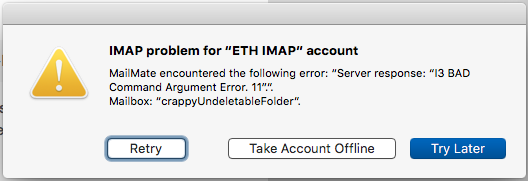
However, I have now executed the last two lines, i.e.mv ~/Library/Application\ Support/MailMate ~/Library/Application\ Support/MailMateNoBug mv ~/Library/Application\ Support/MailMateBug ~/Library/Application\ Support/MailMateThen fired up MailMate. I started, didn't crash, only had issues with a folder I previously couldn't delete from inside MailMate (see attached screenshot). That folder can be deleted from the native mac application Mail, but, surprising to me, now also from inside of MailMate.
Status: To get back to the most recent state of mailboxes I reversed the commands, as suggested:
mv ~/Library/Application\ Support/MailMate ~/Library/Application\ Support/MailMateBug
mv ~/Library/Application\ Support/MailMateNoBug ~/Library/Application\ Support/MailMate
Since MailMate is currently working fine I have no further questions and thank you for your support.
However, if you want to dig further I can upload log files if you tell me which you want. I fully understand if you do not want to pursue this particular issue though, since it increasingly looks rather local and not very reproducible.
Thank you again for a great product.
Best,
Simon -
benny
I'm afraid there is nothing to debug now since the “state” is gone. As I stated earlier “The problem is a bug in MailMate which I have not been able to track down, because it has a tendency to resolve itself before I get sufficient debug info.”
(It's not your fault that I did not get sufficient data.)
The mailbox deletion problem appears to be related to an Exchange server. This server can be quite unpredictable and the error messages are mostly useless. (This does not mean that it's not somehow a MailMate issue.)
Thanks for the feedback.
-
Simon Nørrelykke
Thank you for Exchange server pointer and overall support.
As far as I am concerned the issue is now resolved.
Simon.
Please Sign in or create a free account to add a new ticket.
With your very own profile, you can contribute to projects, track your activity, watch tickets, receive and update tickets through your email and much more.