Print without header

-
 Meindert
Another printing request: Optionally to run the messages together rather than one per line.
And another header request: Allow copying a message with header (the displayed header, not the raw source everything-including-the-kitchen-sink header).
-
benny
- State changed from new to accepted
@Bogac: No, not yet.
@Meindert: I assume you mean instead of “one per page”.
-
Meindert
"@Meindert: I assume you mean instead of “one per page"
Yes, which I think is how you originally handled it? There are times when each way makes more sense. Two use cases where running e-mails together on a page makes sense:
(1) When the messages are really short.
(2) When you're printing out an exchange to archive in paper form: Recently I had some e-mails I had to file with tax materials that I needed as proof of some transactions for which I had no other receipts, and noone will ever look at this stuff (unless I'm audited), so I don't want to waste paper and shelf space on it.
-
benny
@Meindert: I forgot that it's actually possible to overwrite the default behavior. It's not very flexible, but you can at least get the old behavior back. Save the attached file in the following folder (which you must create):
~/Library/Application Support/MailMate/Resources/MmMessagesWebView/-
 stylesheet.css
62 Bytes
stylesheet.css
62 Bytes
-
-
benny
@Bogac: The attached css file hides the headers of the message. The only problem is that the headers still take up space - they are just not printed. I'll note to improve that.
-
stylesheet.css
45 Bytes
-
-
benny
@Bogac: Ok, I improved it now. When the next update is out then the attached css file hides the headers completely. No need to use the previously attached css file. (And I know these really should be GUI options, but it'll have to do for now.)
-
stylesheet.css
74 Bytes
-
-
Bogachan Celen
Terrific, thanks so much benny.
-
Stacey Marshall
Think I miss-understood what the stylesheet was for, as I am still seeing the header when I print, in preview at least. Was hoping to loose the header as neither Mail.app or google will do so.
~ ls -l "$HOME/Library/Application Support/MailMate/Resources/MmMessagesWebView/" total 8
-rw-r--r--@ 1 stacey staff 74B 11 Apr 23:46 stylesheet.css ~ cat "$HOME/Library/Application Support/MailMate/Resources/MmMessagesWebView/stylesheet.css" @media print { .header { display: none; } .headers { display: none; } } ~ -
benny
@Stacey: I'm not seeing that. It appears to still work for me. Try relaunching MailMate to make sure the stylesheet has not been cached somehow. Also, try the latest test version to make sure we are on the same page: Hold down ⌥ when clicking “Check Now” in the Software Update preferences pane.
-
Stacey Marshall
Hi Benny,
I'm sure this must be some misunderstanding... As requested I have updated to latest Version 1.9.6 (5368).Checked the CSS file and restarted MailMate.
$ cd ~/Library/Application\ Support/MailMate/Resources/MmMessagesWebView
$ ls -l stylesheet.css
-rw-r--r--@ 1 stacey  staff    74B 11 Apr 23:46 stylesheet.css
$ cat stylesheet.css
@media print {
    .header { display: none; }
    .headers { display: none; }
}
$
I've attached the PDF which shows the mail headings still included.
Thanks.
-
stylesheet.css
74 Bytes
-
Print_without_header.pdf
45.2 KB
-
-
benny
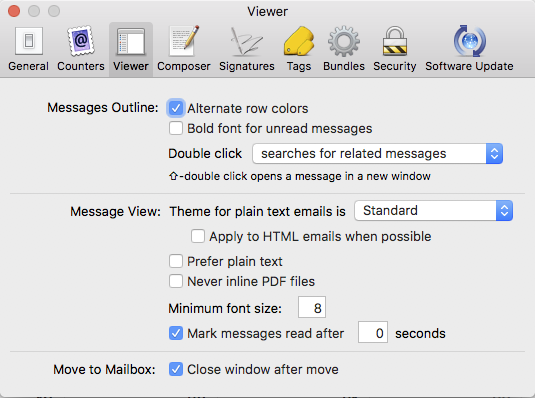
It appears you are doing the right thing and I'm not sure why I'm not seeing the same issue. It might be settings-related. Could you send me a screenshot of the Viewer preferences pane?
-
Stacey Marshall
Sure, screenshot of Viewer Properties attached. I shall try some other settings.
-
Stacey Marshall
So I selected (enabled) - "Prefer plain text".
Back in the e-mail from yourself I press ⌘-P and voilà, preview with no heading
-
Stacey Marshall
Further to yesterdays finding, as Prefer Plain Text is not always ideal, I then disabled that option, but oddly the print-heading is still no longer present! So I guess some underlying issue.
-
benny
In any case, it would be nice if the print dialogue provided options for leaving out headers and/or page-breaks. This would have the added advantage of probably more accurately print some times of HTML messages (it can be tricky to combine headers with existing arbitrary HTML). It's not a high priority, but I'm keeping the ticket open.
-
Stacey Marshall
And oddly today, switching 'Prefer plain text' does nothing for me!
Resorted to Cmd-Alt-U, copied the HTML out of the email to separate file, opened in browser and printed it. -
Robert Brenstein
Let me add a vote for a setting in the print dialog allowing us to decide whether we print the normal mail headers (default) or not on the print-task basis. If I understand correctly, the stylesheet solution is a global on/off switch. If so, it is too awkward when same emails should be printed with and without headers. I just had to print a bunch of invoices that came as emails and they do not look as proper invoices when printed with headers. We are talking about filing them for tax purposes (a copy of the same invoice with the headers is printed and filed for our reference). Email-based invoices seem to be used quite a bit it seems, so I think the usage of such a setting is ensured. This setting should be independent from preferring plain text or html.
-
Alan Dobkin
- State changed from accepted to new
I'd like to add another request to this thread. In particular, I want to remove the Tags: header from printed messages. It helps to see this header when viewing messages on the computer, but printed messages are often given to someone else or passed around. The standard headers are factual, but tags are subjective for internal categorization. I don't see any value in having this printed, especially if it contains personal/private tags. For example, it could be embarrassing to present a printed message in a meeting and have the recipient see it was tagged as low priority.
I tried using the stylesheet.css file to make this change, but I'm not sure if that is possible. If it is, I don't know the syntax to remove a specific named header.
-
benny
- State changed from new to fixcommitted
@Alan: This makes sense and it's the default behavior in the next update (both excluding Tags and Security, the latter is currently shown when something is signed/encrypted).
More importantly, while looking into this I rewrote some printing related code and for the first time in MailMate: User configurable settings in the printing panel! For now, there's a setting to disable printing headers and a setting to disable the insertion of a page break between messages.
This will be part of the next update (r5900).
-
Alan Dobkin
That sounds excellent, Benny! I look forward to trying it out.
-
benny
It's available now: Hold down ⌥ when clicking “Check Now” in the Software Update preferences pane to get the latest test release.
-
Please Sign in or create a free account to add a new ticket.
With your very own profile, you can contribute to projects, track your activity, watch tickets, receive and update tickets through your email and much more.