Sudden permanent deletion of emails

-
 benny
bennyThat sounds horrible! There are no auto-delete rules in MailMate by default. The closest is moving emails to Junk if using SpamSieve, but this should never lead to permanent deletion (which is done with different IMAP commands).
First, restoring emails: If you have a backup (like Time Machine) then you can find the emails in a standard format within a hierarchy of folders at this location:
/Users/<username>/Library/Application Support/MailMate/Messages/Restore them to a different location on your machine (like your Desktop or Downloads) and then use “File ▸ Import Messages...” within MailMate to re-import them.
Second, debugging:
- What is the hostname of this server?
- Do you use any other email clients?
- Any other services with access to your account?
- Were you online when this started happening?
-
Please locate and send me the following file (Help ▸ Send Feedback):
/Users/<username>/Library/Application Support/MailMate/Mailboxes.plist
Hopefully, we can find out what happened here. It would be really bad if MailMate is to blame. For the record, I don't have any other reports.
-
Cecil
I made a backup to my home server about 12 hours before this happened so I've only lost 1/2 day of email, so I can recover to that point. Fortunately, I don't think I lost anything important.
Here is the information you requested:
What is the hostname of this server?No server, just my laptop connected to home wireless router?
Do you use any other email clients? RCN.COM
GMAIL.COM
MSN.COM
(listed i Mailboxes.plist) Any other services with access to your account? NO
Were you online when this started happening? Yes - wirelessly through home router.Please locate and send me the following file (Help ▸ Send Feedback):Attached
Thanks for your help
-
 Mailboxes.plist
8.98 KB
Mailboxes.plist
8.98 KB
-
-
benny
Ok, I can confirm that you have no rules in the
Mailboxes.plistfile.I meant the hostname of the IMAP account for which this happened?
Did it only happen for one of the IMAP accounts or did it happen for all accounts with emails in your Inbox?
Do you use custom key bindings and do you have a key bound to deletion? (I'm thinking maybe some kind of “stuck” key event could trigger something -- although in that case the emails should be in “Deleted Messages”.)
-
Cecil
Server hostnames:
imap.rcn.com
imap-mail.outlook.com
imap.gmail.comI think each of my accounts was affected.
I don't use custom key bindings (I have selected gmail key bindings); no key bound to deletions.
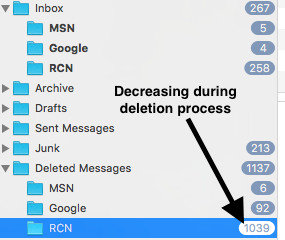
I did notice that during the deletion process the deleted folders counts was decremented - this triggered me to stop the application.
-
 inbox.png
38.9 KB
inbox.png
38.9 KB
-
-
benny
So the decrease happened within a mailbox for deleted messages? Then it could be the server that started deleting messages. This could, e.g., happen once a day. I did some googling and found this link which seems to imply that they don't like that emails stay on the server (which is how IMAP works) -- and trashed messages are deleted after just 15 days. Could this perhaps explain it?
Google keeps deleted messages for 30 days if I remember correctly.
-
Cecil
The messages that were deleted were from the past 3 days.
I am investigating the gmail bindings to see if I keyed some combination to trigger the delete - say of the entire mailbox and I just halted it before it completed??? -
Cecil
Thanks for the RCN link. To avoid ever loosing a message, I am assuming my smart mailboxes don't do this? It looks like archiving on the imap server is the only way since MailMate does not store messages locally?
-
benny
- State changed from new to cantreproduce
Alternatively, you can setup a rule to move these messages into another, more sensible, IMAP account.
I'll mark the ticket as
cantreproduce, because you wrote the messages disappearing were more recent. Let me know if it happens again.As a backup, you could setup a rule on your RCN Inbox with a single Run Command action using “Command ▸ Export ▸ Copy to Folder”.
-
Cecil
The “Command ▸ Export ▸ Copy to Folder” works just fine. Thanks for the tip.
Please Sign in or create a free account to add a new ticket.
With your very own profile, you can contribute to projects, track your activity, watch tickets, receive and update tickets through your email and much more.