Outlook365 Sync Issues

-
 benny
bennyI haven't seen this error before, but it appears that office365 is throttling your connection. It's not a standard response. It's just a human readable string and there's no way for MailMate to reliably parse it.
According to the message then waiting a few minutes should allow MailMate to continue, but since MailMate would continue synchronizing the account then I'm guess the error would soon return.
How large is the account in terms of number of messages and/or total message size?
I'm afraid there's nothing I can do other than suggest that you take the account offline some time before letting it continue to synchronize. (Alternatively, I could perhaps try detecting the human readable string and put MailMate into a special throttle-state -- which already exists to handle similar behavior from Gmail.)
-
Bryan Channon
I've been trailing MailMate and have bumped into the same issue - also using Office 365. Once while initially syncing my mail, and now when trying to clear my deleted messages folder. I have 250k emails across my entire account, and 60k deleted messages.
-
benny
@Bryan: You need to enable “watching” the ticket to get my replies.
Ok, that is a pretty big account and that makes it more likely to trigger throttling when initially synching the account. I don't see though why clearing deleted messages would trigger it. This makes me think that there might be some kind of busy looping involved. Try this:
- Take the account offline a few hours to make sure it's no
longer throttled.
- Open the “Activity Viewer”
(⌥⌘0).
- Take the account online and let it start working on deleting
those emails.
- If/when you get the error, use “Help ▸ Send Server Logs” to send me the logs.
Thanks in advance! (And thanks for trying out MailMate.)
- Take the account offline a few hours to make sure it's no
longer throttled.
-
Bryan Channon
@Benny
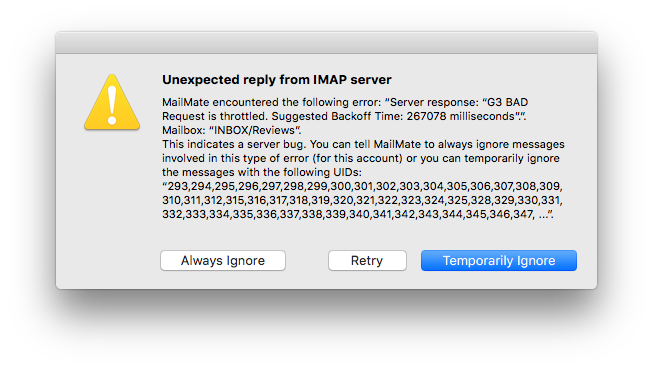
Unfortunately I wasn't able to replicate again after my first reply. I'd managed to delete about 40k when I replied and the the last 20k were deleted without incident afterwards. I even deleted my MailMate preferences and let it download my whole mailbox over again (now at 221k emails) and it didn't trigger again. I'm afraid the only other evidence I have is a screenshot of the error dialog (attached).
-
benny
- State changed from new to cantreproduce
That error window seems to indicate that MailMate doesn't handle it well, but it's also terribly wrong for the server to report
BADwhen this happens instead ofNO. The former indicates some kind of syntax issue and this is not what happens here.If you do happen to trigger this issue again then I could try to see if I can make MailMate use the same throttling-code as it does when Gmail reports a throttling issue. Just let me know.
-
benny
- State changed from cantreproduce to fixcommitted
The next update of MailMate includes an attempt to detect and handle the throttled state, but this is not tested. Anything after r5425 includes this “fix”. If someone sees this working (or not) then let me know.
-
Please Sign in or create a free account to add a new ticket.
With your very own profile, you can contribute to projects, track your activity, watch tickets, receive and update tickets through your email and much more.