Folders not in alphabetical order
After a while folders that moved around end up in a not alphabetical order (multiple computers use the same imap account at the same time). How can i solve this? (See attached file)
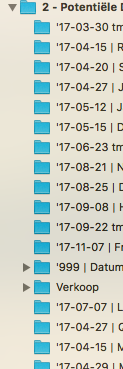

-
 benny
bennyHow do they “move around”? Is this a side-effect of mailboxes being created/deleted on another machine?
(Note that IMAP itself does not have ordering of IMAP mailboxes. The ordering is maintained by MailMate.)
-
Mitch
They move around during the day, can't say how exactly. Could be a side effect, but mailmate should correct that right? I can't change the order manually.... How can i solve this?
-
benny
You should be able to reorder IMAP mailboxes using drag'n'drop. This is a MailMate feature and it's only saved locally (there's no way to tell the IMAP server of a specific ordering).
I can see that this feature might get into trouble if mailboxes are often added/removed using another email client. I can try to reproduce that if you think this is what triggers the issue.
Maybe you can describe how you get these date-based folder-names? And when are they no longer date-based? Are they some times renamed?
Note that most users do not often add/remove IMAP mailboxes and therefore even old bugs related to this might not have been reported.
-
benny
- State changed from new to fixcommitted
I've now changed the code such that new mailboxes reported by the server are always inserted alphabetically -- even if mailboxes have been reordered manually at some point (which makes MailMate switch to manual ordering for the IMAP mailbox involved). I believe this should make it more stable, but given that I don't know exactly how your issue is triggered I could be wrong.
Thanks for the report.
-
Mitch
Great, very fast fix! It looks stable now (used it since today).
-
-
Mitch
Same problem is happening again on two different (apple) computers.
Edit: I use mailmate with experimantal 2.0 feature ON. with the function: "Experimental 2.0 Feature" switched OFF the ordering corrects it self again.
-
benny
- State changed from fixreleased to cantreproduce
The experimental preference has very little effect. Are you sure this made a difference?
I don't think you ever told me how the data-based folders are created/deleted. I think this could play a role with respect to how to fix this bug.
-
Mitch
The on/off switching of the 2.0 features indeed wasn't the solution... A solution is to restart mailmate.
Each folder is created by hand within mailmate: Right click on the main folder and then: New Mailbox.
-
benny
- State changed from cantreproduce to fixcommitted
So, after restarting the mailboxes are sorted alphabetically?
But when you create them then they are not inserted alphabetically?
I played with this and I think I see the problem with creating new IMAP mailboxes (something I rarely do, sorry). It appears to always (or maybe there's a random factor) stay at its initial location with its default name. I can also see similar issues when renaming mailboxes.
...
Ok, I've tried to fix these issues. Let me know if it still doesn't work as expected after the next release.
Thanks for the report.
-
-
Gary Sanctuary
Hi Benny,
You mentioned above "You should be able to reorder IMAP mailboxes using drag'n'drop. This is a MailMate feature and it's only saved locally (there's no way to tell the IMAP server of a specific ordering)."
I've manually altered a mailbox in the past but having now decided on a new ordering naming syntax would like the mailbox to revert to its alphabetical re-sorting default.
However I can't figure out how to do that.
Regards,
Gary -
Anco van Vliet
Hi Benny,
I have stil problems.
"After a while folders that moved around end up in a not alphabetical order (multiple computers use the same imap account at the same time). How can we solve this?"Look forward to hear from you.
-
benny
@Gary: Manually reordering sets a preference on the folder which is currently not available in the GUI. You'll have to manually edit the following file while MailMate is not running and then remove
sortOrder = "manual";/Users/<username>/Library/Application Support/MailMate/Mailboxes.plist@Anco: I'm not sure if this might be the same issue.
-
Raoul
Hi Benny,
I'm using Mailmate for half a year now and i'm also experiencing this issue. New sub folders I or someone else create don't sort automatically in alphabetical order but they do when I drag them to another folder.
All the folders i create end at the bottom. I tried to remove the sortorder="manual" in /Users//Library/Application Support/MailMate/Mailboxes.plist but i can't find the mailmate folder or mailboxes.plist on my macbook.
Can you help me? Looking forward to hear form you.
Please Sign in or create a free account to add a new ticket.
With your very own profile, you can contribute to projects, track your activity, watch tickets, receive and update tickets through your email and much more.