text reformatting #2

-
 benny
benny- State changed from new to accepted
Sorry about the late reply. For some reason the ticket (and your earlier comments on an existing ticket) went into a spam filter.
MailMate bases its replies on the plain text body part of incoming emails. Unfortunately some email clients softwrap the HTML body part and hardwrap the plain text body part. Most notably Gmail does this.
There is an experimental workaround which unwraps the text. You can try that by pasting the following in a Terminal window and then relaunch MailMate:
defaults write com.freron.MailMate MmAutomaticUnwrapEnabled -bool YESFeedback is welcome since I might want to make it a GUI option. I'll keep the ticket open to track any progress on that.
Future versions of MailMate are also going to be able to embed the original HTML of the replied message. (That would also kind of solve this problem at the expense of generating an HTML message itself.)
-
Andrey Ust
Hi,
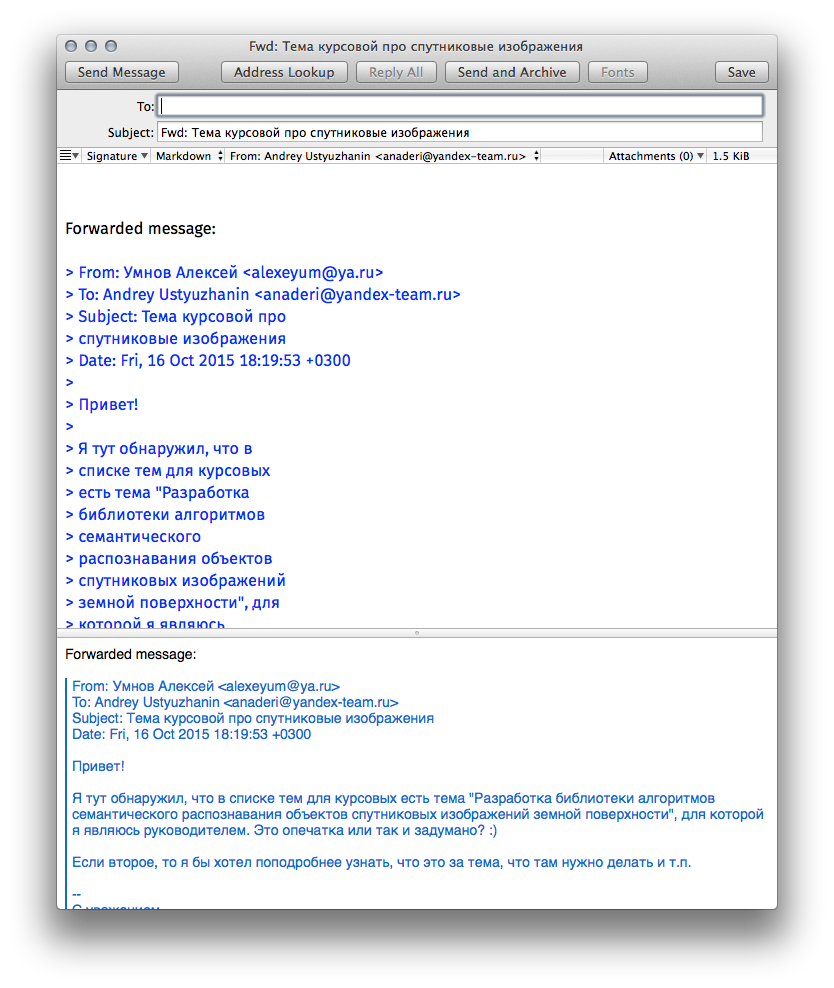
I've updated defaults by the command you suggest, but after restart it still wraps the text like this:
-
benny
The Composer works best (only) with fixed width fonts. As you can see, the wrapping is fine in the preview of the message below the text field. In other words, this does not affect your outgoing messages.
I'm a bit surprised though that the wrapping width is as bad as it is in your screenshot. MailMate computes a fixed number of characters per line for the dynamic wrapping of the Composer text field and this is based on the width of an 'M'. It's a bit of a hack in order to properly prefix the
>symbols. (Hopefully I'll be able to improve this some day, but it's not currently high on my list.) -
Andrey Ust
Hi Benny,
AFAIK outgoing message contains both HTML & text parts and in some clients only text part is displayed. so it is not uncommon that I see poorly wrapped message in reply on my mail from my recipient. Which is a bit annoying.
you say
MailMate computes a fixed number of characters per line for the dynamic wrapping of the Composer text field and this is based on the width of an 'M'
may it happen that characters you count are not UTF8 characters but regular ASCII ones? (hence length in UTF8 chars is half less?)
-
benny
Yes, you are right about counting bytes. This is (I believe) correct behaviour when generating an email, but in the Composer window it doesn't make sense as your screenshot also shows. I'll look into if this could be easily fixed.
For generated emails it is also problematic if the message is sent to an email client not supporting
format=flowed(the definition of a careless email client), but it's not much better to switch to counting unicode characters since line wrapping would still be hardcoded. For this case I've considered makingformat=flowedoptional. The alternative is the ugly quoted-printable encoding. Well, for Russian it would probably be base64 -- both encodings would be unreadable in their raw form. -
benny
- State changed from accepted to fixcommitted
Ok, the Composer issue is fixed for the next update. Russian text now wraps at the right border (when using a fixed width font).
If you would like
format=flowedto be optional then create a new ticket. -
Andrey Ust
great! looking forward towards next release.
-
benny
You can try it now like this: Hold down ⌥ when clicking “Check Now” in the Software Update preferences pane.
-
Andrey Ust
Perfect! muuuuch better now!
-
-
Matt Wean
Thanks for adding this! I was just coming to request it! It would be great as a GUI option.
Please Sign in or create a free account to add a new ticket.
With your very own profile, you can contribute to projects, track your activity, watch tickets, receive and update tickets through your email and much more.