Outgoing messages stuck "pending submission", Alert requested

-
 benny
benny- State changed from new to accepted
I'm truly sorry about the consequences of what might be a MailMate bug.
You have a good point about making it more clear when there are pending messages although I'm not sure exactly how it could happen in the first place. I do have a few similar reports though and I'm investigating.
A workaround for now: Enable one of the additional counters in the Counters preferences pane and let it count all messages in Drafts.
64 bit vs 32 bit: In the About window of MailMate, if the revision number is larger than 5000 then it's the 64 bit versions. The currently official release is r5035 which is probably what you have now. There is also r5046, but I'm not sure it's sufficiently stable for general use yet.
Please let me know if you see this issue again.
-
benny
Just to make you less paranoid: I think the main issue is fixed in the 64 bit release. The problem is that the OS some times tells MailMate that a server is unreachable. This makes MailMate wait until the OS tells it that the server is reachable. This works fine most of the time, but for some people on some networks it cannot be trusted. A while back I changed the IMAP code such that it essentially ignores the reachability state. In the 64 bit releases I've done the same for SMTP.
Making it more clear when there are pending emails would still be nice though and I'll keep the ticket open for that.
-
downtown
I was getting ready to email about this issue, and see it here already in the list. I've been burned also, but nothing too bad. Keeping a keen eye on the drafts folder. Using Version 1.8 (4576) on OSX 10.10.2.
The fix for me is to quit and restart MailMate. As soon as it starts, the mails leave. I cannot find any other way to set them free. I leave MailMate open all the time, so I wonder if that has something to do with this issue as it seems to happen every few days.
Attached shows two that got stuck this afternoon.
-
 pending_submission.png
65 KB
pending_submission.png
65 KB
-
-
nux
Hello,
Just created an account to say I've seen this issue as well. I sent you (Benny) and e-mail on Nov 12th 2014 about the issue. It's come up occasionally and got me real good the other day. Business related messages got stuck for a few days.
I host my own mail server in the same network as where this happens. Postfix/Dovecot setup. The server it runs on is very underutilized so I can't imagine it was triggered by a connection issue to the server or a slow response.
Anyways, I'd be happy to try and help figure this out, but not sure what I could do to help.
Thanks
-
-
Pierre Chartrand
I have now the same problem with one of my 3 gmail accounts. The two others works well, same config than the non working one. I receive everything but sendind always have the pending submission problem. MailMate version : 1.9.5 on OS 10.10.5
Thank you for your help. -
benny
@Pierre: Try updating to the latest test release: Hold down ⌥ when clicking “Check Now” in the Software Update preferences pane. Also try sending me your account settings via “Help ▸ Send Feedback”:
~/Library/Application Support/MailMate/Sources.plist ~/Library/Application Support/MailMate/Submission.plist -
Pierre Chartrand
I updated and sent you details via Send Feedback.
Thanks for all. Waitng for more infos. -
Paul Calnan
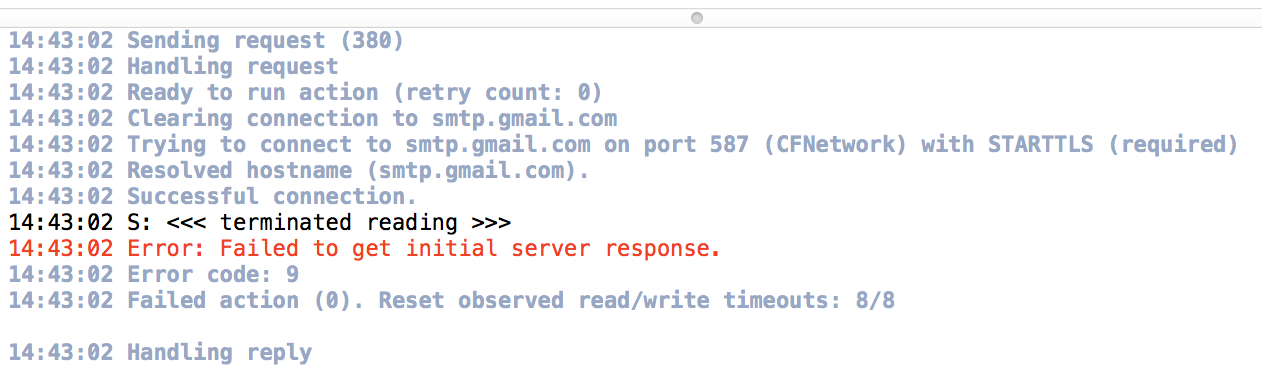
This issue just started happening to me a few days ago. Messages get stuck in the Outbox with "Pending Submission" status. This only seems to be happening on one of my Google Apps accounts. I have attached a screenshot showing the Activity Viewer when the message fails to send.
-
benny
- State changed from accepted to fixcommitted
@Paul: I fixed this silent failure very recently. I'm not sure if something changed at Google which makes it more likely to happen, because I've had several recent reports about it. You can get a test release here: Hold down ⌥ when clicking “Check Now” in the Software Update preferences pane. Unfortunately this might just mean that you'll get an error message instead. You can create a new ticket for that.
The issue reported by Pierre was fixed after an email exchange, so I'm closing this ticket for now.
By the way, with regard to the original issue MailMate now has a red counter for the Drafts mailbox whenever something has not been sent yet.
-

Please Sign in or create a free account to add a new ticket.
With your very own profile, you can contribute to projects, track your activity, watch tickets, receive and update tickets through your email and much more.